
Arrow Puzzle Tap Away: How a Tap-Only Rule Changes Strategy
By JingPublished Updated 11 min read2,040 words
In this guide
Arrow Puzzle Tap Away is the third arrow game on this site, and the one that actually changes the rules. It keeps the exit rule of Arrow Escape: tap a tile, and if the straight lane from it to the edge of the board is empty in the direction its arrow points, the tile slides off. Four things around that rule are different: every tile is a single arrow, the board is cut to the shape of a picture, there are three hearts instead of four, and every blocked tap costs one of them, with no free second try.
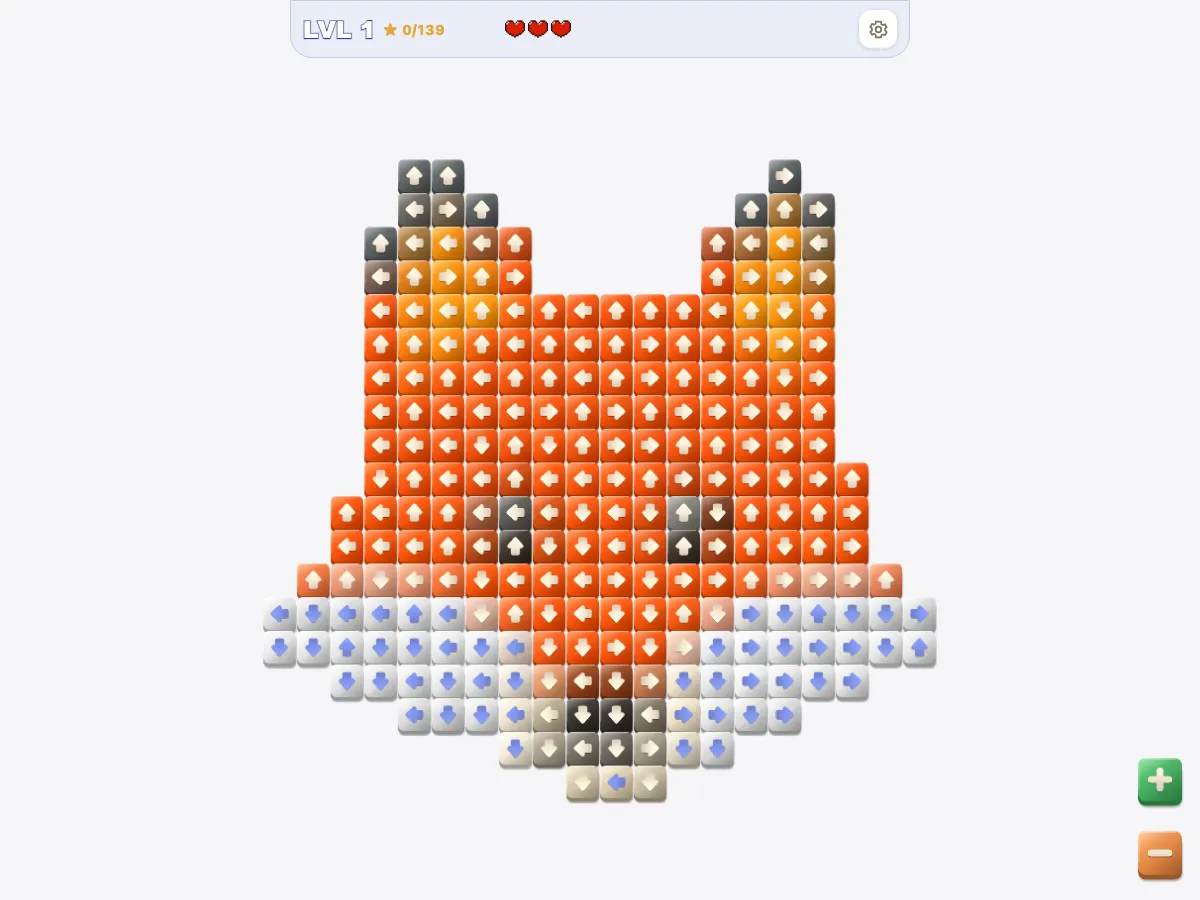
That is what this guide means by the tap-only rule: the tap is the whole move. A tile either leaves or does nothing, with no nudging it partway, no undo, and a heart for every failure. What follows is how strategy shifts under that rule, read from the game's code, not guessed from its boards.
What the tap-only rule means when every tile is an arrow
In Arrow Escape an arrow is a path of two or more cells with the arrowhead at one end, and long bodies act as walls: one arrow lying along an edge can hold back a dozen others. In Arrow Puzzle Tap Away every arrow occupies exactly one tile. There are no bodies and no walls, and each departure empties one cell, so the only tiles it can free are the ones whose lane ran through that cell.
The exit check itself is unchanged. The game looks along the straight line from the tapped tile to the border of the grid in the direction of its arrow; if every cell is empty the tile slides off, and if any cell is occupied the tap is blocked. Empty is broader here: cells outside the picture's outline, and any holes inside it, hold no tiles and never block anything.
So the scan changes. The habit from the Arrow Escape tips for beginners, reading the four edges for heads that point off the board, still works, but it finds only some of the free tiles, because the outline of the picture puts edges in the middle of the grid. A tile beside a notch or a hole is on an edge for that direction even when it sits nowhere near the border.
Three hearts, and a heart for every blocked tap
A level starts with three hearts, and a blocked tap costs one. The difference from Arrow Escape is the second wrong tap. Arrow Escape remembers the last arrow that blocked you and lets you tap it again for free; Arrow Puzzle Tap Away does not. Tapping the same blocked tile twice costs two hearts, and there is no cheap way to test a tile by tapping it.
What a blocked tap buys instead is a picture of the lane. The tapped tile flashes red, and every occupied cell along its line shakes in turn, starting with the tile itself and running outward toward the border. The tiles that shake are exactly the ones that must leave before this one can, so a lost heart shows the whole chain in front of it; trace it to its far end and ask which of those tiles is itself free.
When the third heart goes, the board freezes and a card offers a refill to three hearts, limited to ten a day, or a restart. The refill keeps the board, the clock and your streak as they are; the restart puts every tile back, resets hearts and clock, and sets the streak to zero. Closing the card with its corner button is a restart too.
The picture is the board: outlines, holes and edges in the middle
Every level is a picture. The tiles are colored to form it, the cells they sit on are exactly its silhouette, and when a tile leaves, a dot in its color stays behind, so the picture is still there in dots when the board is empty. The colors are for the picture only. A tile's color says nothing about whether it can move.
The silhouette moves the edges. On a packed rectangle the free tiles at the start sit on the border facing out; here the border is the picture's outline, and outlines have concave parts. Wherever the outline steps inward, the tiles at the step face empty cells in that direction. But empty space is not an exit by itself: the lane has to stay empty all the way to the border of the grid, not just to the edge of the picture.
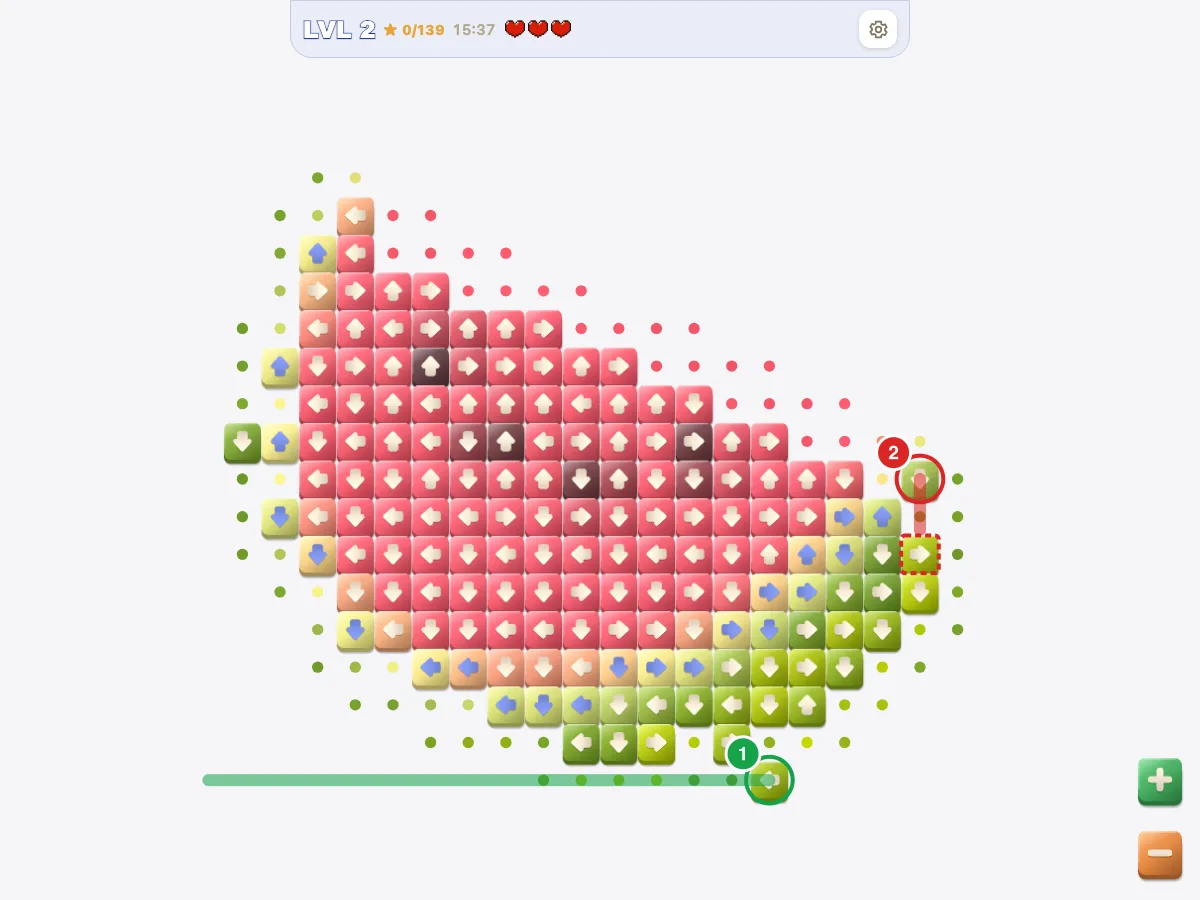
That distinction is the one that costs hearts. A tile pointing into a hole is still blocked by whatever sits on the far side of the hole, and a tile pointing across the gap of a U-shaped outline is blocked by the other arm. A tile at a notch whose line leaves the picture and never re-enters it is free. The question for every tile near the outline is whether its line leaves the picture for good.
Why no order can trap you, and what the free tiles tell you
Removing a tile only empties a cell, so a tile that can move stays movable until you tap it, and no sequence of legal taps can make a clearable board unclearable. Why move order decides arrow puzzles works through that argument for Arrow Escape, and it holds here unchanged, because it rests on the exit rule alone. The cost of a wrong order is hearts and clock, never the level.
Draw an edge from each tile to every tile whose lane it sits in; a tile with no incoming edge is free. Clearing the board is then a topological ordering of that graph, and Wikipedia's description of Kahn's algorithm, which starts from the nodes with no incoming edges and removes them one at a time, is a description of how the game is played.
Such an ordering exists only when the graph has no directed cycle, so a finishable level contains no ring of tiles blocking one another. Several free tiles means the order among them barely matters; one free tile means a single-choice stretch, where the only clue to the next free tile is the cell that just emptied. With one tile per arrow that clue is precise: only tiles in that cell's row or column, pointing toward it, can have been freed.
The routine for every tap follows from this:
- Read the arrow on a candidate tile and trace its line to the border of the grid. If every cell on the line is empty, tap. If not, do not tap; the first occupied cell on the line is the tile to trace next.
- When a tile leaves, look along the emptied cell's row and column for tiles pointing toward it; those are the only tiles the departure can have freed.
Reading the tiles: ink, zoom and the mouse hover tell
The arrows are drawn on tiles whose colors come from the picture, so the game has to pick an ink that stays legible on any of them. It does this per tile with the relative luminance formula from the Web Content Accessibility Guidelines, L = 0.2126 R + 0.7152 G + 0.0722 B: tiles brighter than a fixed cutoff get a slate-blue arrow, darker tiles a cream one.
The game zooms from one to three times with the corner buttons, a pinch or the mouse wheel, and pans when you drag. A drag also cancels a tap: the tile darkens when pressed, but the tap fires only when you lift without moving more than a few pixels, so a finger on the wrong tile can slide away and lift safely.
On a device with a mouse the game gives away more. Hovering over any tile makes its arrow bob; hovering over a tile that can move also draws faint chevrons pulsing in the empty cell just beyond it. That is a free test: sweep the cursor along the outline and the free tiles announce themselves, at no cost in hearts.
The game decides whether to draw that layer with the browser's pointer media feature, which MDN defines as testing how accurate the primary pointing device is, coarse like a finger on a touchscreen or fine like a mouse. On a coarse pointer the hover layer is never drawn, so on a phone the only test is the trace.
The clock and the streak: what carries over from Arrow Escape
The clock is Arrow Escape's clock: none on the first level, and from the second level on a countdown of four seconds for every tile on the board, never less than two minutes, rounded up to the next five seconds. It turns to the warning color at one minute and pauses whenever a card is on screen. At zero the game offers two more minutes, labeled as a rewarded ad, or a retry.
The streak counts consecutive clears without a restart. It shows in the top bar as a flame with a multiplier from the second clear, and the banners match Arrow Escape's: three clears is "On a roll!", five "Impressive!", ten "Unstoppable!", fifteen "Legendary!", with a gold banner at levels 10, 25, 50 and 100. A heart refill or a time bonus does not break it; a restart does.
| Arrow Escape | Arrow Puzzle Tap Away | |
|---|---|---|
| An arrow | A path of two or more cells, arrowhead at one end | One tile |
| The board | A packed rectangle, some levels square | A picture's silhouette; holes and notches are empty |
| Hearts | Four; a repeat tap on the same blocked arrow is free | Three; every blocked tap costs one |
| Out of hearts | One heart back, or retry | Refill to three, ten a day, or restart |
| Clock | None on level 1; four seconds per arrow, two-minute floor | Same, per tile |
Worlds, the gallery, and the order you have to play in
Each cleared picture goes into a themed world such as Fruits, Wild & Farm or City Traffic. Once you have collected at least one picture, the game opens on a world map with a progress bar for each world, and tapping a world opens its gallery: the pictures you have collected, which enlarge when tapped; the one you are on; and the rest grayed out behind a lock.
Levels are strictly in order. Only the lowest level you have not cleared is playable, the map's button always opens it, and there is no level select or hint button. A board that has you stuck therefore cannot be skipped; the only ways forward are the three hearts, the refill and the restart.
Progress lives in the browser on the device you play on, separate from Arrow Escape's, and nothing is sent to a server. The settings panel has a reset that wipes the collection behind a confirmation. Once every picture is collected the game says so and offers to start again from the first level, with the gallery intact.
What to read next
The mechanics above are the whole game; what changes from level to level is the picture and how many tiles are free at once. For the rules this game shares with its parent, and the measured boards that show what single-choice stretches look like, the complete Arrow Escape guide is the reference. Seven common Arrow Escape mistakes lists the habits that cost hearts; all of them apply here except the third, which relies on a free repeat this game does not give.
For the wider family, how to solve traffic jam puzzles separates the one-tap puzzles from the sliding kind, where a wrong order can cost the level.
Or start collecting: play Arrow Puzzle - Tap Away and use the clockless first picture to practice the trace along the outline. If you would rather learn the exit rule on a plain rectangle first, Arrow Escape has no clock on its first level either, and everything learned there transfers, apart from the free repeat.
arrow puzzle tap awayarrow escapepuzzle strategy
Play the game

Frequently asked questions
- Is there a time limit in Arrow Puzzle Tap Away?
- Not on the first level. From the second level on there is a countdown of four seconds per tile, never shorter than two minutes, and it waits while any card is on screen. When it runs out you can take two extra minutes or restart the level. A heart refill resumes the same clock.
- How do I know which tile can move on a phone?
- On a touchscreen there is no hover, so the only way is to trace: follow the arrow from the tile to the border of the grid and check that every cell on the way is empty, including the far side of any hole. On a computer, holding the mouse over a free tile shows small chevrons ahead of it.
- Can I choose which level or picture to play?
- No. Levels unlock one at a time, and the map's button always opens the lowest level you have not cleared. The gallery lets you view pictures you have already collected and shows the rest locked. The only route to a later picture is through the board in front of you, with the hearts you have.
Sources
- Topological sorting — Wikipedia (Accessed June 26, 2026)
- Understanding Success Criterion 1.4.3: Contrast (Minimum) — W3C Web Accessibility Initiative (Accessed June 26, 2026)
- pointer CSS media feature — MDN Web Docs (Accessed June 26, 2026)
External links are provided for reference and are not endorsements.